Claude Code GitHub integration
Edit the workflow, keep the repository yours
Repo Fleet edits and checks your Claude Code GitHub Actions workflow as cards, then commits it back to your repository.
Choose what the app may see
- Install the GitHub App on chosen accounts, then grant all repositories or a selected list.
- Your GitHub sign-in must list an installation before Repo Fleet links it.
- Nothing outside your grant is read; only workflow files are edited.
- GitHub user and installation tokens live for one call, never in our database.
- No code is stored here; bookkeeping records linked accounts and whether their last read worked.
- Older installations with missing permissions link to GitHub to accept the new grant.
- Contents: read workflows and branches; push the branch receiving your edit.
- Workflows: create or update .github/workflows files; Contents alone cannot authorize this.
- Pull requests: open one when you save to a new branch.
- Actions: list runs and start one from the app.
- Metadata: read-only access required of every GitHub App.
Edit cards or YAML
- Choose an account, repository, branch, and .yml or .yaml directly under .github/workflows.
- No import or project setup: the file on that branch is the document.
Read and change the whole workflow
- Cards show the agent, permissions, environment variables, triggers under When it runs, and jobs under What it does.
- A pencil opens each editable card's form.
- Step cards add trash and reorder arrows; action inputs show each key above its value.
- The highlighted Code tab edits the same document; either view immediately reads the other's changes.
Save and start a run
- Commit to the current branch or name a new branch and open a pull request back.
- The commit stays in your repository and your account's history.
- Saves check the SHA you opened; a changed file is refused while your edits stay on screen.
- Dispatch the committed workflow on a chosen branch with its declared inputs; unsaved edits must be saved first.
Catch mistakes before a run
- Checks run on load and every edit; findings list line numbers and open the matching card or code.
- Errors never block saving: the dialog counts them and asks before proceeding.
Syntax and schema
- YAML must parse before other checks run.
- The published GitHub Actions JSON schema is bundled locally, so schema checks need no network call.
Errors a run would hit
- Missing needs and dependency cycles.
- Duplicate step IDs.
- Unknown step, matrix, or input references.
- Unbalanced expressions and invalid cron schedules.
Risk warnings
- Actions without a pinned ref.
- Jobs without timeout-minutes.
- Secrets inside shell commands.
- GITHUB_TOKEN writes without permissions.
- Pull-request head checkout under pull_request_target.
- On-the-hour schedules, when GitHub's queue is longest.
Check action references against GitHub
- After offline checks, fetch each action or reusable workflow's repository, ref, and declaration.
- Missing refs, unknown inputs, and omitted required inputs are errors.
- Deprecated inputs warn with the action's message; called workflows also have their declared secrets checked.
- Docker images, unreadable repositories, and declarations that cannot parse warn as unchecked, not errors.
- Local step actions are left alone; local reusable workflows resolve on the shown branch.
- Session lookups cache by repository, ref, and path; typing never refetches an unchanged reference.
Start a pipeline with one confirmation
- A connected, in-plan repository with no workflow on its default branch gets a starter offer on its repository card.
- Confirm to write .github/workflows/repo-fleet.yml on that branch; nothing else changes.
- The starter sends the oldest open issue labelled fleet:todo to Claude Code every hour and pushes the work.
- Before running, add ANTHROPIC_API_KEY in GitHub and label eligible issues fleet:todo.
- The dialog names the secret, label, branch, and where runs appear.
A complete template, passing the editor's checks
- 24/7 Developer, the recommended start, empties the issue queue one issue at a time.
- It creates fleet:todo, fleet:doing and fleet:needs-attention on its first run.
- It takes the oldest issue in hand first, so a run that died is resumed rather than left.
- It closes what it finishes, and parks what it cannot with a comment saying why.
Read runs on your own clock
- Up to thirty runs from the last seven days, newest first, one card per run, never a chart.
- Each card shows status, workflow, run number, trigger, and time; branch and duration appear when GitHub supplies them.
- Open GitHub logs and any pull request associated with the run.
- A capped window says how many runs it read; a quiet week shows the last run.
- Never run? See the workflows' trigger events, or a notice that no workflow exists.
- Set a profile time zone for every app timestamp: recent times are relative, older dates local; no choice means UTC.
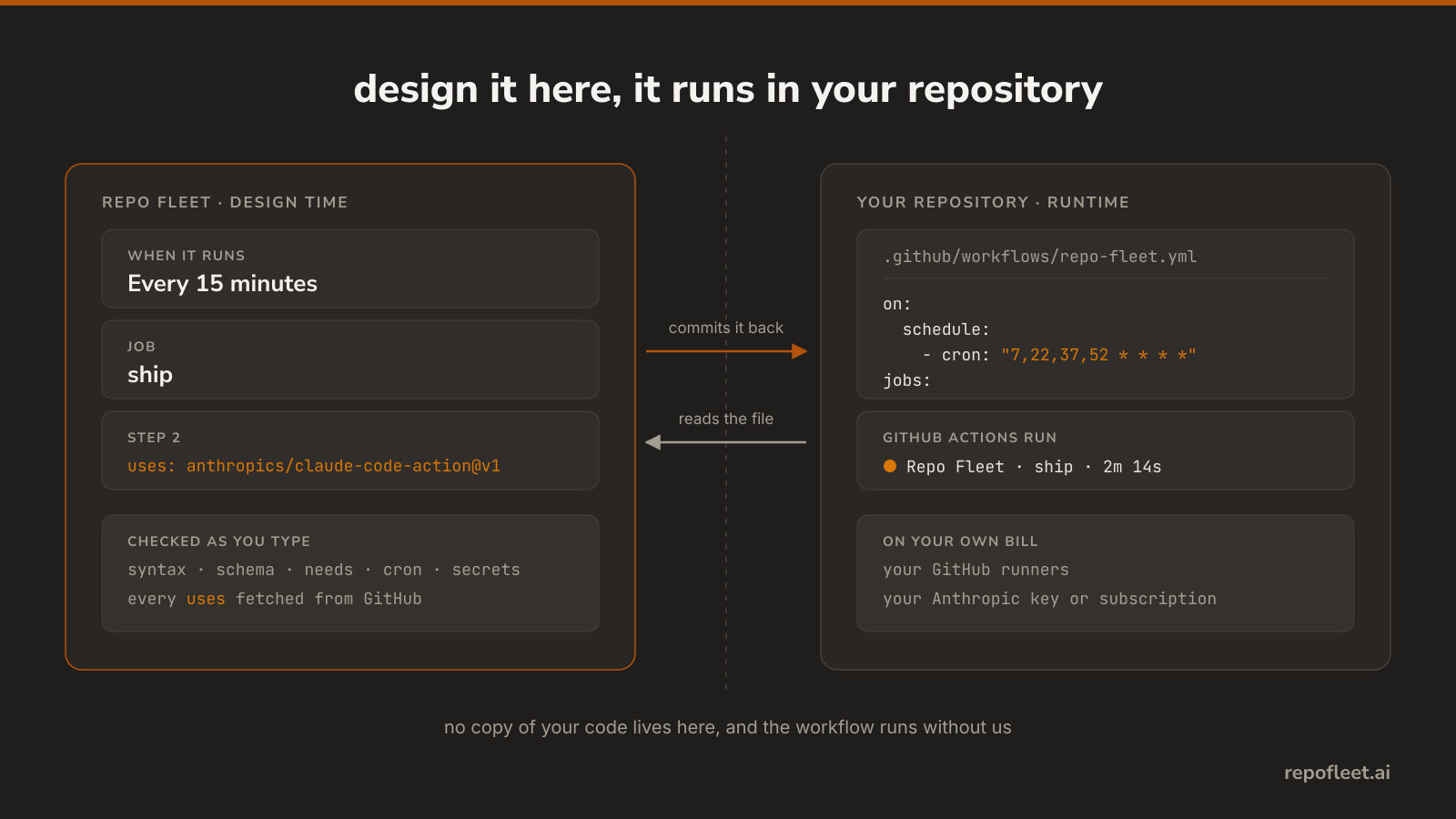
Designed here, run in your repository
- The result is an ordinary GitHub Actions workflow; Repo Fleet reads and writes that file, not a hosted copy of your code.
- Runs use your GitHub minutes and repository secret: an Anthropic API key or a Claude subscription token.
- Uninstall Repo Fleet and the workflow keeps running without us.
Every plan runs on your own GitHub runners with your own model key. Repo Fleet meters no task, no token, and no minute.
Claude Code in GitHub Actions
- How do you run Claude Code in GitHub Actions?
- How do you run Claude Code on a schedule with nobody watching?
- How do you review a pull request with Claude Code in GitHub Actions?
- Should you run Codex or Claude Code in GitHub Actions?
- Cursor or Claude Code: which one runs without you at the keyboard?
- OpenCode or Claude Code: which one should run in your CI?
- How do you use Claude Code hooks to guard an unattended run?
- How do you run a team of Claude Code agents in one workflow?
- What can a Claude Code run actually do in your repository?
Every feature is in Free; Pro adds repository reach
- Every agent you build, the workflow editor and its checks, the starter pipeline, and the run list.
- Free: Every public repository on every account you link. One private repository in total, however many accounts you link.
- Pro: Every public and private repository on every account you link, however many.
- $9.99 per month; 30-day trial, no card needed.