Claude Code in GitHub Actions
Should you run Codex or Claude Code in GitHub Actions?
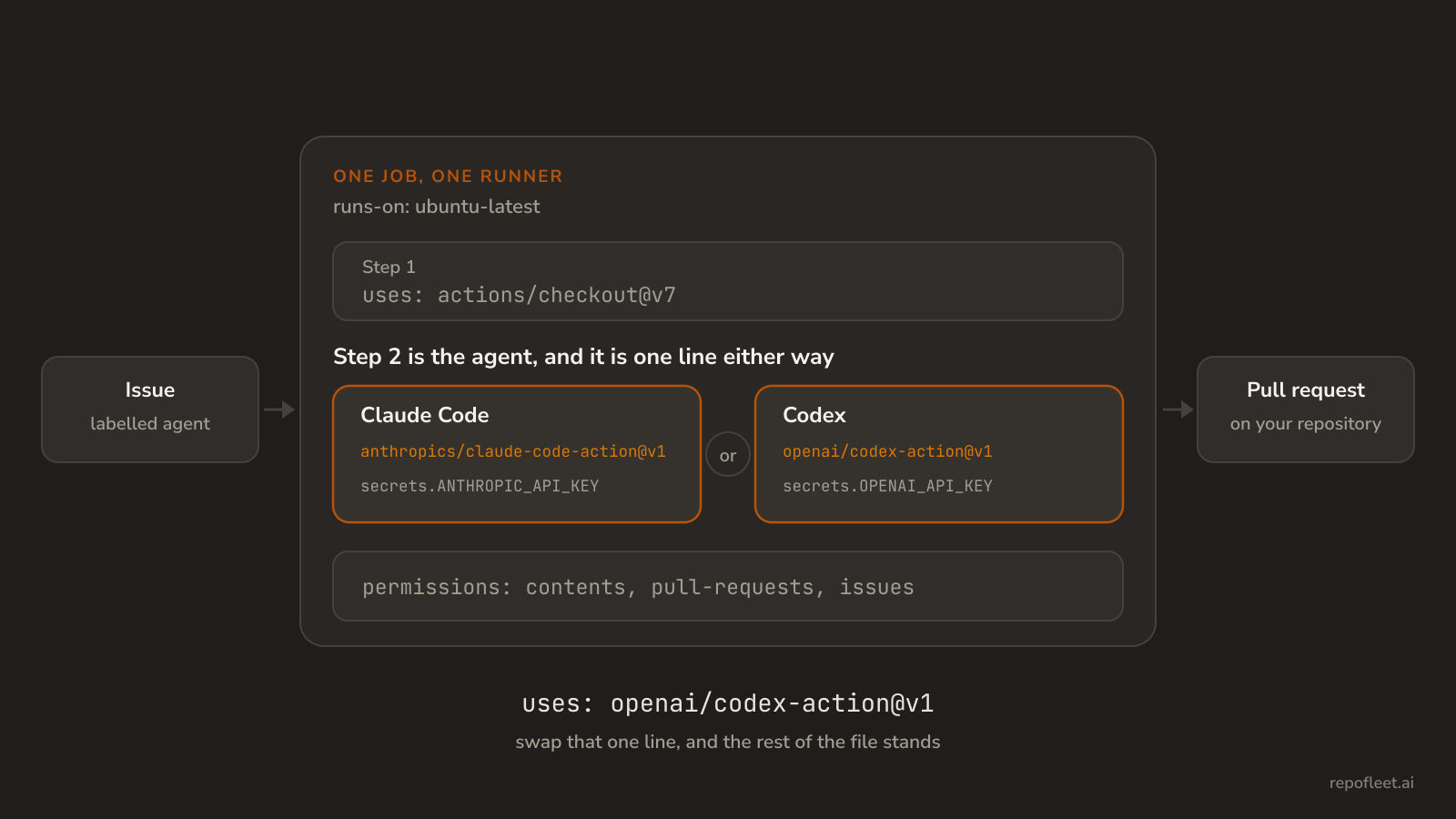
Both agents run as one step in a workflow you own, on your runner and your key. The two workflow files side by side, what each action does for you, and how to pick.
Listen to this guide
The short answer
Either one runs. Both ship a single GitHub Actions step that installs a coding agent on the runner and hands it a prompt, and both bill an API key you hold. Pick Claude Code when you want the agent to commit, push, and comment for you. Pick Codex when you want the agent sandboxed to the checkout, and the git work in your own steps.
Nothing else about the setup changes. The trigger, the permissions block, the secret, and the timeout are GitHub's, not the agent's, so swapping one action for the other is a few lines in one file.
What each one is
- Claude Code is Anthropic's terminal agent. anthropics/claude-code-action installs it on the runner, hands it your prompt, and gives it git and
ghalready signed in. Given no prompt, it waits for@claudein a comment instead. - Codex is OpenAI's. openai/codex-action installs the Codex CLI, starts a proxy to the Responses API with your key, and runs
codex execunder a permission profile. It has no comment trigger and does no git work. - Both are one step in a workflow you own. Neither is a hosted service you hand the repository to: the file lives in
.github/workflows, the run happens on GitHub's runner, and the key is a repository secret.
The workflow that runs Claude Code
- Save it as
.github/workflows/agent.ymlon the default branch, addANTHROPIC_API_KEYto the repository's secrets, and create a label namedagent. How do you run Claude Code in GitHub Actions? explains every line of it.
name: Agent

on:
  issues:
    types: [labeled]

# Push a branch, open a pull request, comment on the issue: nothing more.
permissions:
  contents: write
  pull-requests: write
  issues: write

jobs:
  implement:
    # Every label fires the event; only the agent label starts a run.
    if: github.event.label.name == 'agent'
    runs-on: ubuntu-latest
    timeout-minutes: 30
    steps:
      - uses: actions/checkout@v7

      - name: Implement the issue and open a pull request
        uses: anthropics/claude-code-action@v1
        with:
          anthropic_api_key: ${{ secrets.ANTHROPIC_API_KEY }}
          github_token: ${{ secrets.GITHUB_TOKEN }}
          prompt: |
            Issue #${{ github.event.issue.number }} is yours.
            Read it with `gh issue view ${{ github.event.issue.number }}`.
            Do what it asks, and run the build and tests if there are any.
            Commit on branch agent/issue-${{ github.event.issue.number }}.
            Push it, then open a pull request with `gh pr create`.
            Its body ends with `Closes #${{ github.event.issue.number }}`.
          claude_args: |
            --allowedTools "Bash,Edit,Write,Read,Glob,Grep"
            --max-turns 60
            --max-budget-usd 5
- The action does the git work. It drops the checkout's credential, signs commits as
claude[bot], and exportsGH_TOKEN, so everyghcommand the prompt names is already signed in. --max-budget-usdstops the run at a spend and--max-turnsat a number of model calls, withtimeout-minutesas GitHub's hard stop over both.
The workflow that runs Codex
- Same trigger, same permissions,
OPENAI_API_KEYinstead. Codex edits the checkout and stops there, so the step after it commits, pushes, and opens the pull request.
name: Agent

on:
  issues:
    types: [labeled]

permissions:
  contents: write
  pull-requests: write
  issues: write

jobs:
  implement:
    if: github.event.label.name == 'agent'
    runs-on: ubuntu-latest
    timeout-minutes: 30
    steps:
      - uses: actions/checkout@v7

      # Codex gets no network under :workspace, so the issue is fetched first.
      - name: Put the issue on the runner
        env:
          GH_TOKEN: ${{ secrets.GITHUB_TOKEN }}
          ISSUE: ${{ github.event.issue.number }}
        run: gh issue view "$ISSUE" --json title,body > issue.json

      - name: Implement the issue
        uses: openai/codex-action@v1
        with:
          openai-api-key: ${{ secrets.OPENAI_API_KEY }}
          permission-profile: ":workspace"
          prompt: |
            issue.json holds the issue you are working on.
            This checkout is the default branch.
            Do what the issue asks, and run the build and tests if there are any.
            Leave your changes in the working tree; a later step commits them.

      - name: Open the pull request
        env:
          GH_TOKEN: ${{ secrets.GITHUB_TOKEN }}
          ISSUE: ${{ github.event.issue.number }}
        run: |
          rm issue.json
          git config user.name 'codex[bot]'
          git config user.email 'codex[bot]@users.noreply.github.com'
          git checkout -b "agent/issue-$ISSUE"
          git add -A
          if git diff --cached --quiet; then
            echo "Codex changed nothing."
            exit 0
          fi
          git commit -m "Work issue #$ISSUE"
          git push -u origin HEAD
          gh pr create --title "Issue #$ISSUE" --body "Closes #$ISSUE"
permission-profile: ":workspace"lets Codex write the checkout and nothing else, and grants it no network, so anything the build downloads is installed in a step before it.- The action checks the actor has write access before it runs, on top of the label gate; only
allow-usersandallow-botswiden that.
What differs once it is on a runner
| Claude Code | Codex | |
|---|---|---|
| The step | anthropics/claude-code-action@v1 |
openai/codex-action@v1 |
| The credential | anthropic_api_key, or claude_code_oauth_token from a subscription |
openai-api-key only |
Git and gh |
signed in by the action | your own steps |
| What it may touch | the tools --allowedTools names |
the permission-profile, no network under :workspace |
| Started by a comment | @claude, when the step is given no prompt |
no |
| Caps inside the file | --max-turns, --max-budget-usd |
timeout-minutes alone |
| What it hands back | an execution_file output, and a job summary under display_report |
a final-message output |
Which one to run
- Claude Code, if one step should carry an issue all the way to a pull request, or you want
@claudeon a comment to start a run. - Codex, if the agent should touch nothing but the checkout, or you already have branch and pull request steps and only want a model behind them.
- Claude Code, if a Claude subscription is what you are paying for;
claude_code_oauth_tokentakes it in place of the key, and Codex takes an API key alone. - Whichever you run, the
permissionsblock is what bounds it: see How do permissions and secrets work in GitHub Actions?, and Inputs, outputs, and secrets for getting the key into the step without it reaching a log. - Try one, read the run, and swap the step if it is not the one. Nothing above it changes.
What Repo Fleet does about it
Repo Fleet is where you build these workflows and watch them run, across every repository you connect. The file stays yours: a GitHub Actions workflow in your repository, on your runners, billed to your own key. Repo Fleet holds no model key and meters nothing.
- Both actions are modelled in the agent editor. Every input above is a labelled field, so the choice between them is a step you swap rather than YAML you retype.
- Every edit is checked as you type, by the same checks both workflows on this page pass.
- A runs page for each repository, newest first, saying what each run shipped.
Open the app, connect a GitHub account and choose its repositories, then pick a template and save it. The next labelled issue is the agent's.