Claude Code in GitHub Actions
OpenCode or Claude Code: which one should run in your CI?
One action takes any trigger you name; the other answers a comment and refuses every other event. The headless command for each, the workflow file for each, and how to pick.
Listen to this guide
The short answer
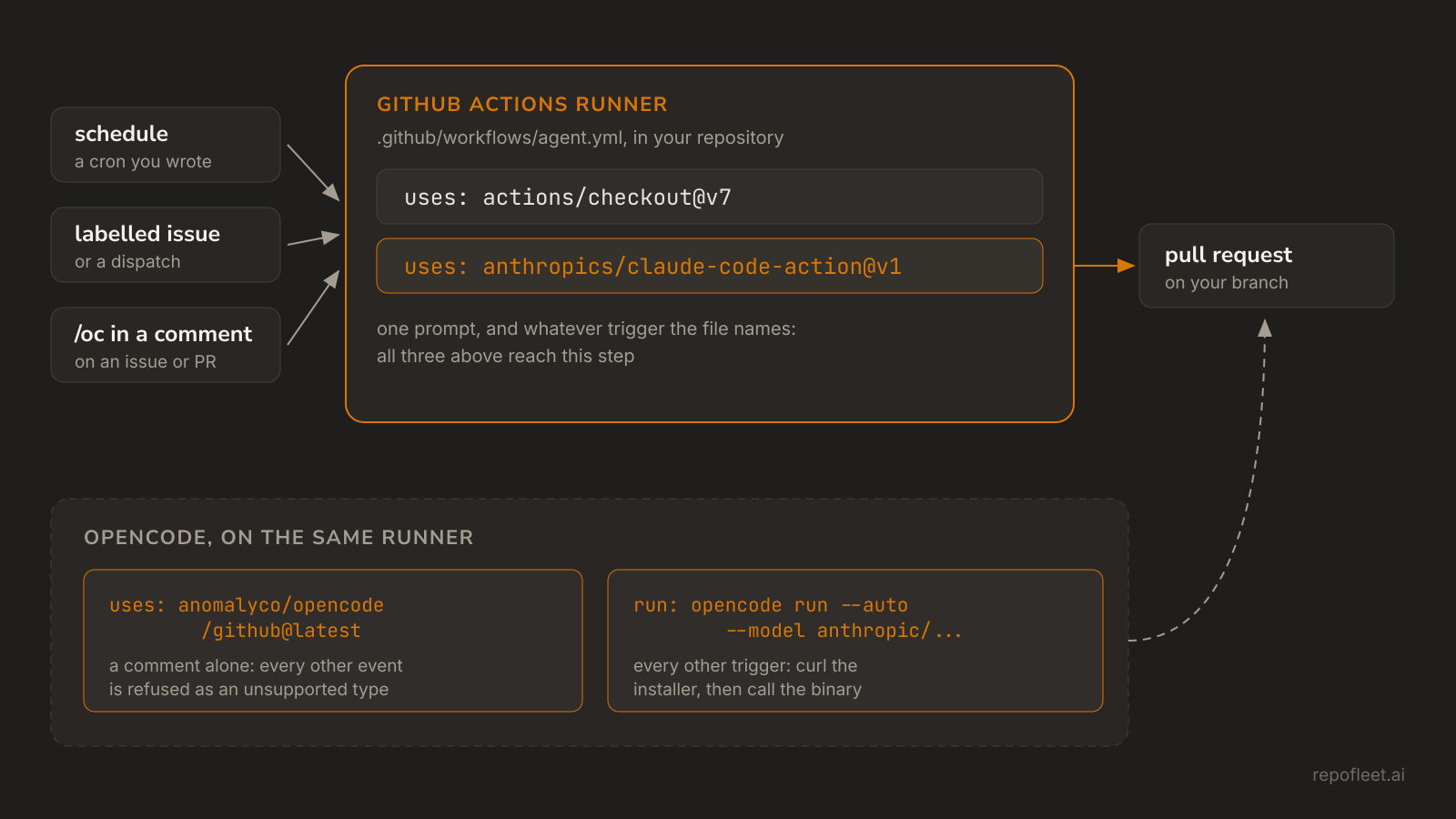
Claude Code, if the run starts without a person. Its action takes a prompt and whatever trigger your workflow names, so a cron, a labelled issue, or a dispatch all reach it. OpenCode's action answers /oc in an issue or pull request comment and throws Unsupported event type on anything else, so unattended work runs its CLI from a plain run: step instead.
OpenCode, if the model has to be yours to choose. It is MIT-licensed and provider-agnostic: --model names any provider it knows, so the same step runs Claude today and something else tomorrow. Claude Code runs Claude. Nothing else about the file changes either way, so trying one costs a commit.
What each one is
- Claude Code is Anthropic's terminal agent. anthropics/claude-code-action installs it on the runner, hands it your prompt, and gives it git and
ghalready signed in. Given no prompt, it waits for@claudein a comment instead. - OpenCode is Anomaly's, and MIT-licensed. Same shape at the keyboard: a terminal agent, with a desktop app and editor extensions beside it.
- OpenCode names its model per run.
--model provider/modeltakes any provider on models.dev and reads that provider's key from the environment, soanthropic/claude-sonnet-5and a local model are the same flag. - anomalyco/opencode/github is its action. On a comment naming
/ocor/opencodeit reads the thread, then branches, commits, and opens a pull request itself.
Running each one headless
- Both take a prompt as an argument and exit, which is all a runner needs. Everything below is one of these two commands inside a step.
# Claude Code, installed with npm i -g @anthropic-ai/claude-code
claude -p "Fix the failing test" --allowedTools "Bash,Read,Edit"

# opencode, installed with curl -fsSL https://opencode.ai/install | bash
opencode run --model anthropic/claude-sonnet-5 "Fix the failing test"
- Claude Code reads stdin and writes JSON.
--output-format jsonreturns the result with the session id and a cost estimate, and--permission-modesets the baseline for a run nobody is watching. - OpenCode writes JSON too, under
--format json.--autoapproves anything its config does not explicitly deny, which is what makes it usable where no one can answer a prompt. - Each bounds itself differently. Claude Code takes
--allowedToolson the command; OpenCode reads apermissionmap ofallow,ask, anddenyfromopencode.jsonin the repository.
The workflow step for each
- Claude Code's action is the whole job. Save this as
.github/workflows/agent.ymlon the default branch, addANTHROPIC_API_KEYto the repository's secrets, and create a label namedagent. How do you run Claude Code in GitHub Actions? explains every line.
name: Agent

on:
  issues:
    types: [labeled]

# Push a branch, open a pull request, comment on the issue: nothing more.
permissions:
  contents: write
  pull-requests: write
  issues: write

jobs:
  implement:
    # Every label fires the event; only the agent label starts a run.
    if: github.event.label.name == 'agent'
    runs-on: ubuntu-latest
    timeout-minutes: 30
    steps:
      - uses: actions/checkout@v7

      - name: Implement the issue and open a pull request
        uses: anthropics/claude-code-action@v1
        with:
          anthropic_api_key: ${{ secrets.ANTHROPIC_API_KEY }}
          github_token: ${{ secrets.GITHUB_TOKEN }}
          prompt: |
            Issue #${{ github.event.issue.number }} is yours.
            Read it with `gh issue view ${{ github.event.issue.number }}`.
            Do what it asks, and run the build and tests if there are any.
            Commit on branch agent/issue-${{ github.event.issue.number }}.
            Push it, then open a pull request with `gh pr create`.
            Its body ends with `Closes #${{ github.event.issue.number }}`.
          claude_args: |
            --allowedTools "Bash,Edit,Write,Read,Glob,Grep"
            --max-turns 60
            --max-budget-usd 5
- OpenCode's action is the whole job too, on the one trigger it accepts.
use_github_token: trueruns it onGITHUB_TOKEN; without it the action exchanges an OIDC token withapi.opencode.ai, which means installing OpenCode's GitHub App and grantingid-token: write.
name: opencode

on:
  issue_comment:
    types: [created]

# The action branches, commits, and answers the comment under this token.
permissions:
  contents: write
  pull-requests: write
  issues: write

jobs:
  opencode:
    # Every comment fires the event; only a mention starts a run.
    if: contains(github.event.comment.body, '/oc')
    runs-on: ubuntu-latest
    timeout-minutes: 30
    steps:
      - uses: actions/checkout@v7
        with:
          fetch-depth: 1
          persist-credentials: false

      - name: Answer the comment
        uses: anomalyco/opencode/github@latest
        env:
          ANTHROPIC_API_KEY: ${{ secrets.ANTHROPIC_API_KEY }}
          GITHUB_TOKEN: ${{ secrets.GITHUB_TOKEN }}
        with:
          model: anthropic/claude-sonnet-5
          use_github_token: true
- On any other trigger the action is not an option, so these two steps go in the job instead, and later steps commit and push what OpenCode leaves behind.
- name: Install opencode
  run: curl -fsSL https://opencode.ai/install | bash

- name: Work the issue
  env:
    ANTHROPIC_API_KEY: ${{ secrets.ANTHROPIC_API_KEY }}
  run: |
    export PATH="$HOME/.opencode/bin:$PATH"
    opencode run --auto --model anthropic/claude-sonnet-5 \
      "Read issue.json, do what it asks, and leave the change in the working tree."
Where they differ
| Claude Code | OpenCode | |
|---|---|---|
| The step | anthropics/claude-code-action@v1 |
anomalyco/opencode/github@latest, or two run steps |
| Triggers its action accepts | any the workflow names | issue_comment and pull_request_review_comment alone |
| The credential | anthropic_api_key, or claude_code_oauth_token from a subscription |
the provider's own key in env |
| The model | Claude | any provider --model names, from models.dev |
Git and gh |
signed in by the action | by the action on a comment, your own steps otherwise |
| What it may touch | the tools --allowedTools names |
the permission map in opencode.json, plus --auto |
| Its default token | GITHUB_TOKEN you pass it |
an OpenCode App token, unless use_github_token |
| What the ref pins | the action and the lockfile it installs from | the action; the agent is whatever the installer serves |
| Source | the action is MIT, the agent is Anthropic's | MIT, agent and action both |
| Caps inside the file | --max-turns, --max-budget-usd |
timeout-minutes alone |
Which one to run in CI
- Claude Code, when the run has no person behind it: a nightly cron, a labelled issue, a queue worked while you sleep. That is one file with one action in it, and running on a schedule is the same file with the trigger swapped.
- Claude Code, when a subscription is what you already pay for;
claude_code_oauth_tokentakes it in place of the key, and OpenCode reads provider keys alone. - Claude Code, when spend has to stop inside the file rather than at the runner's timeout.
- OpenCode, when the model is the point: a provider your policy names, an open-weights model, or one you host.
- OpenCode, when
/ocon a pull request comment is the whole workflow you want, and nothing has to run unattended. - Both, if you are undecided. They are steps in the same job, reading the same checkout, so the comparison costs a commit and a run you read afterwards.
- Whichever runs, the
permissionsblock is what bounds it: see how permissions and secrets work, inputs, outputs, and secrets for getting a key into a step without it reaching a log, runners and shells for where the install lands, and costs, limits, and troubleshooting for what a run spends.
What Repo Fleet does about it
Repo Fleet is where you build these workflows and watch them run, across every repository you connect. The file stays yours: a GitHub Actions workflow in your repository, on your runners, billed to your own key. Repo Fleet holds no model key and meters nothing.
- The agent editor models two agent actions as labelled fields,
anthropics/claude-code-actionandopenai/codex-action, so the OpenCode action is typed as any other action and its CLI as a plainrun:command. - Every edit is checked as you type, by the same checks every workflow on this page passes.
- A runs page for each repository, newest first, saying what each run shipped.
Open the app, connect a GitHub account and choose its repositories, then pick a template and save it. The next labelled issue is the agent's.