Getting started
What is an AI coding agent, and how does one run in your repository?
An AI coding agent is a model wrapped in a loop and handed tools: it reads files, edits them, runs commands, and keeps going until the work is done. What separates it from a model and from a control plane, what a run actually does, where it runs, what it costs, and what to decide first.
Listen to this guide
The short answer
An AI coding agent is a language model wrapped in a loop and handed tools. It reads files, edits them, runs commands and tests, reads what came back, and keeps going until the task is done or a cap stops it. A chat window hands you text to paste. An agent works the repository itself and leaves a commit, a branch, or a pull request behind.
The version worth setting up does not sit on your laptop. It runs unattended in CI, started by a label on an issue or by a schedule, on a token scoped to what it may touch, and it stops at a timeout and a spend cap you wrote down. The rest of this page is that shape: one agent, one repository, one run.
A model, an agent, and a control plane
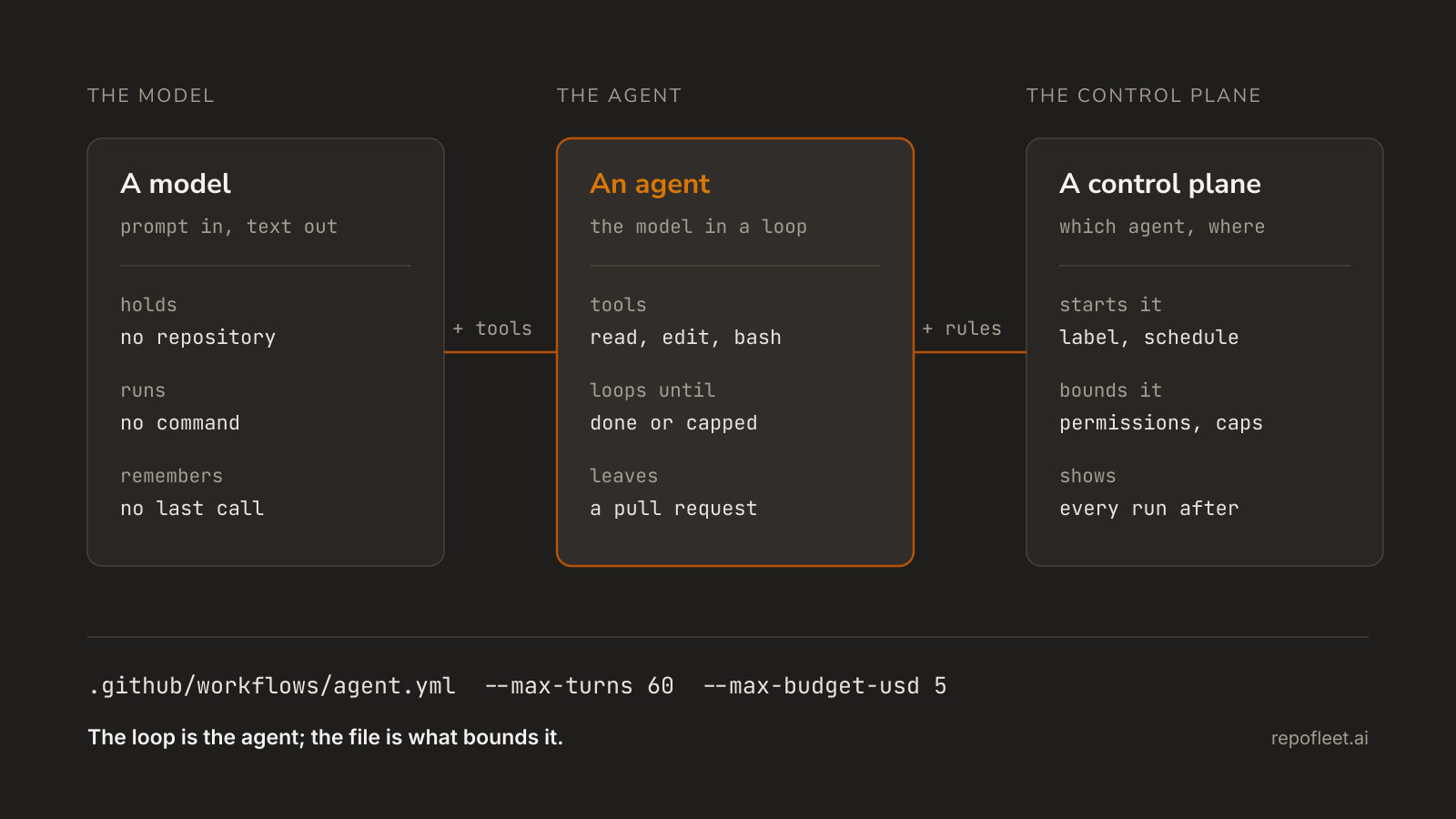
- A model turns a prompt into text. That is all of it: no repository, no shell, and no memory of the call before this one.
- An agent is the program around the model. It hands the model tools, feeds the results back, and loops. The loop is what makes it an agent; the tools are what make it need permissions.
- A control plane sits above both. It decides which agent runs in which repository, on what trigger, with which permissions and caps, and it is where you read what each run did afterwards.
- Most of the confusion comes from all three being sold as "agent". On a pricing page it usually means a model subscription. In a repository it means the loop that edited your code, and only that one has to be bounded.
- You need all three the moment a second repository shows up. One agent in one repository is a file. Ten agents across thirty repositories is an operations problem, and nothing in the agent itself solves it.
What an agent actually does on a run
- It starts from a brief, not a prompt. The brief names the task, the boundaries, and what finished looks like: run the tests, push a branch, open a pull request that closes the issue.
- It reads before it writes. Listing files, grepping for a symbol, and opening the ones that matter are tool calls like any other, and they are most of what a run spends.
- It edits, then checks its work. It runs the build and the test suite, reads the failure, and goes back to the file. That second pass is the difference between a suggestion and a change.
- It uses the repository's own tooling.
git,gh, the package manager, whatever the tests need. Nothing about the agent is language-specific; the runner image is. - It ends in review. A branch and a pull request are the natural output, because they are the artefact a person already knows how to read.
- It stops at a cap. Turns, wall-clock minutes, and dollars are all bounded up front, so a run that goes in circles ends by itself rather than by someone noticing.
The whole of it, as one file a repository can hold:
name: Agent

on:
  issues:
    types: [labeled]

# Push a branch, open a pull request, comment on the issue: nothing more.
permissions:
  contents: write
  pull-requests: write
  issues: write

jobs:
  implement:
    # Every label fires the event; only this one starts a run.
    if: github.event.label.name == 'agent'
    runs-on: ubuntu-latest
    timeout-minutes: 30
    steps:
      - uses: actions/checkout@v7

      - name: Work the issue and open a pull request
        uses: anthropics/claude-code-action@v1
        with:
          anthropic_api_key: ${{ secrets.ANTHROPIC_API_KEY }}
          prompt: |
            Issue #${{ github.event.issue.number }} is yours.
            Read it with `gh issue view ${{ github.event.issue.number }}`.
            Do what it asks, and run the build and tests if there are any.
            Commit on branch agent/issue-${{ github.event.issue.number }}.
            Push it, then open a pull request with `gh pr create`.
            Its body ends with `Closes #${{ github.event.issue.number }}`.
          claude_args: |
            --allowedTools "Bash,Edit,Write,Read,Glob,Grep"
            --max-turns 60
            --max-budget-usd 5
Claude Code is the worked example here because it ships an action that runs it in one step. The shape is the same for any agent with a command-line entry point: check out, install it, run it with a brief and a cap.
Where one runs
- On your machine, in a terminal next to your editor. You approve each risky call, the working tree is right there, and nothing happens while you sleep.
- On a CI runner, started by an event. Nobody is there to approve anything, so the workflow file carries the approvals in advance: what may trigger it, what the token may do, how long it may take. This is the version that scales past one person.
- In a hosted sandbox somebody else operates. Least setup, and your code and your keys sit on their infrastructure under their retention policy, which is a procurement question rather than a technical one.
- The same agent runs in all three. It is a program with a command line; the interesting difference is who is watching and whose bill it lands on, not which one is smarter.
What it costs and who pays
- Two meters, two bills. Model tokens bill the model account whose key the run reads. Runner minutes bill your CI plan. Neither is a subscription to the agent.
- Reading is most of the spend. A run that opens twenty files to change one has paid for twenty. A tight brief that names the file costs a fraction of an open-ended one.
- Cap it in the file.
timeout-minutesbounds the wall clock,--max-turnsbounds the loop, and--max-budget-usdstops the run at a number. A run that fails still spent what it spent. - A key or a subscription. The action takes
anthropic_api_keyfor a key you created, orclaude_code_oauth_tokenfor a plan you already pay for. One credential per agent; nothing reads both. - Model prices move, so the number to trust is your own account's usage page after a week of real runs. Costs, limits, and troubleshooting covers what a run spends and what goes wrong first.
What to decide before you install one
- What starts it. A label is the usual answer, because adding one takes write access, so a person chose. A schedule works the queue overnight. A push trigger on every commit is how a bill surprises you.
- What it may touch. The
permissionsblock is the boundary, and it is a short list: contents, pull requests, issues. Anything the token cannot do, the agent cannot do. - Where the work lands. A branch and a pull request keep a human gate. Committing to the default branch removes it, which suits a repository where the label was the review.
- What the worst run costs. Pick the timeout, the turn cap, and the dollar cap before the first run, not after the first surprise.
- What happens when it is wrong. It will be, some of the time. The answer is a diff someone reads, a test suite that means something, and a branch that is cheap to delete.
- Who owns it in six months. A workflow file nobody maintains rots like any other. Decide who edits the brief when the repository changes shape.
What Repo Fleet does about it
Repo Fleet is the control plane layer: where you build these workflow files, decide which repositories run them, and watch what each run shipped. The agent stays a GitHub Actions workflow in your repository, on your runners, billed to your own key, and Repo Fleet holds no model key and meters nothing.
- The agent editor puts triggers, permissions, jobs, and an action's inputs on plain fields, with the YAML one click away and every edit checked as you type.
- Templates start whole, so a repository with no workflow gets a working agent rather than a blank file.
- A runs page per repository, newest first, with the outcome, the duration, and the pull request a run opened.
- What is Repo Fleet? lays out the same three layers from inside the product, how do you run Claude Code in GitHub Actions? explains the file line by line, and run your first agent is the shortest path to a run.
Install it on GitHub, choose the repositories it may see, and pick a template. The next labelled issue is the agent's.