Claude Code in GitHub Actions
How do you run Claude Code on a schedule with nobody watching?
Claude Code headless on a cron in GitHub Actions: the schedule trigger, the label queue one run takes one issue from, the concurrency group, the turn and budget caps, and what to read the next morning.
Listen to this guide
The short answer
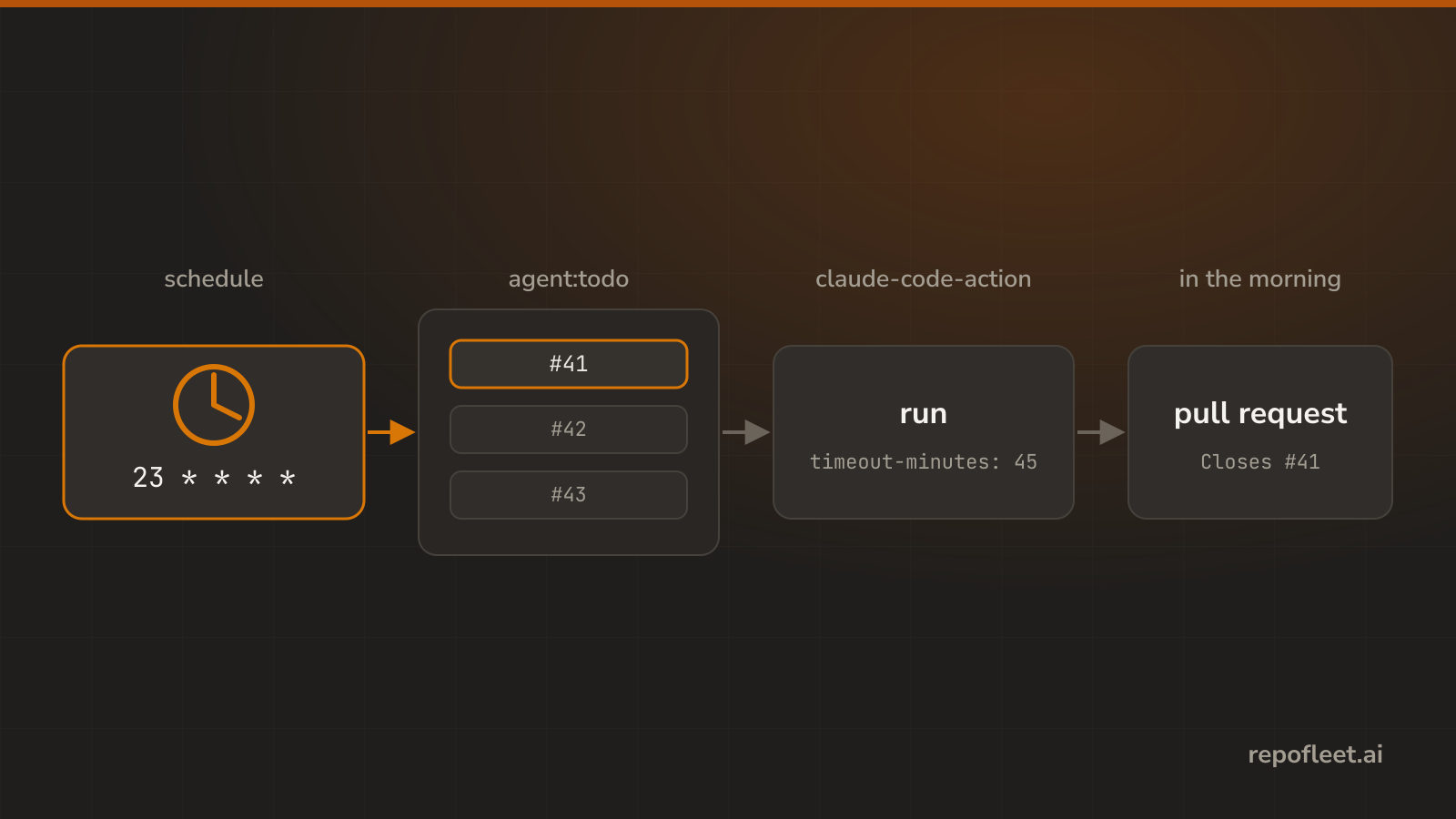
Put Claude Code in a GitHub Actions workflow triggered by schedule, and give it a queue to read. GitHub starts a runner on your cron, Claude Code runs headless in it with a prompt instead of a person, and what it finishes is waiting as a pull request in the morning.
The trigger is the only part that differs from running an agent on a label or a comment. Nobody is there to stop a bad run, so the file has to do the stopping: a queue it takes one item from, a concurrency group, a timeout, and a spend cap.
What unattended changes
- The trigger is a clock.
on: scheduletakes cron expressions in UTC, five fields, no local time and no daylight saving. Triggers and schedules has the field-by-field reference. - Only the default branch runs. GitHub reads scheduled workflows from the default branch alone, so the copy on your feature branch never fires, however good the cron is.
- The run picks its own work. A labelled issue hands a run its subject. A cron hands it nothing, so the first steps have to choose one, which is what the queue below is.
- There is no actor. A scheduled run has no person behind it. It acts as
GITHUB_TOKEN, bounded by thepermissionsblock and nothing else, and it can neither prompt you nor wait for an approval. - GitHub turns it off after 60 days. A scheduled workflow in a repository with no commits for two months is disabled automatically, and the owner gets an email.
- Nothing catches a run that goes wrong. A run that loops, reads the whole repository, or waits on input burns minutes and tokens until a cap in the file ends it.
The workflow file
- Save this as
.github/workflows/scheduled-agent.ymlon the default branch, addANTHROPIC_API_KEYas a repository secret, and create the three labels the next section names.
name: Scheduled agent

on:
  # Hourly, off minute zero: GitHub's schedule queue is longest at the top of the hour and runs start late or are dropped.
  schedule:
    - cron: "23 * * * *"
  # The same run, on demand, so the first one does not wait for the clock.
  workflow_dispatch:

# The run pushes a branch, opens a pull request, and moves the issue it took: nothing more.
permissions:
  contents: write
  pull-requests: write
  issues: write

# A run in flight holds the next one rather than cancelling it, so two runs never take the same issue.
concurrency:
  group: scheduled-agent
  cancel-in-progress: false

jobs:
  work-one-issue:
    runs-on: ubuntu-latest
    timeout-minutes: 45
    steps:
      - uses: actions/checkout@v7

      # The oldest agent:doing first, so work a dead run left half finished is picked up before anything new starts.
      - name: Take one issue
        id: issue
        env:
          GH_TOKEN: ${{ github.token }}
        run: |
          number=$(gh issue list --label agent:doing --state open --limit 1 --search "sort:created-asc" --json number --jq '.[0].number // empty')
          if [ -z "$number" ]; then
            number=$(gh issue list --label agent:todo --state open --limit 1 --search "sort:created-asc" --json number --jq '.[0].number // empty')
          fi
          echo "number=$number" >> "$GITHUB_OUTPUT"
          if [ -z "$number" ]; then echo "Nothing is queued, so this run stops here."; fi

      # The label is what the next run reads, so the issue says it is taken before any work starts on it.
      - name: Mark it as taken
        if: steps.issue.outputs.number != ''
        env:
          GH_TOKEN: ${{ github.token }}
        run: gh issue edit ${{ steps.issue.outputs.number }} --add-label agent:doing --remove-label agent:todo

      - name: Do the issue
        if: steps.issue.outputs.number != ''
        uses: anthropics/claude-code-action@v1
        env:
          GH_TOKEN: ${{ github.token }}
        with:
          # A Claude subscription signs in with claude_code_oauth_token and secrets.CLAUDE_CODE_OAUTH_TOKEN instead of this line.
          anthropic_api_key: ${{ secrets.ANTHROPIC_API_KEY }}
          github_token: ${{ secrets.GITHUB_TOKEN }}
          # A schedule runs as whoever last saved this file, which is a bot when an app saved it.
          allowed_bots: "*"
          prompt: |
            Issue #${{ steps.issue.outputs.number }} in ${{ github.repository }} is yours, and this checkout is the default branch.
            Read it with `gh issue view ${{ steps.issue.outputs.number }}`, do what it asks, and run the build and tests if the repository has any.
            Finished: commit on branch agent/issue-${{ steps.issue.outputs.number }}, push it, and open a pull request whose body ends with `Closes #${{ steps.issue.outputs.number }}`.
            Blocked: say why with `gh issue comment`, run `gh issue edit ${{ steps.issue.outputs.number }} --add-label agent:needs-attention --remove-label agent:doing`, and leave the issue open.
          claude_args: |
            --allowedTools "Bash,Edit,Write,Read,Glob,Grep"
            --max-turns 40
            --max-budget-usd 3
The queue the schedule reads
- Three labels carry the whole state, and
gh label create agent:todomakes each of them once.agent:todois the queue. Anything you would hand a developer goes here, written as a task rather than a complaint.agent:doingmarks the issue this hour's run took. The run adds it before it starts, so nothing else takes the same issue.agent:needs-attentionis where a run parks work it could not finish, with a comment saying why.
- Oldest first, and
agent:doingbeforeagent:todo. That ordering means a run killed by the timeout leaves its issue at the front, and the next hour resumes it rather than starting something new. - One issue a run. The cost of an hour is one run, whatever the queue holds, and a queue of forty drains over forty hours rather than in one expensive burst.
- An empty queue is the normal case. The steps are guarded by
if: steps.issue.outputs.number != '', so a run with nothing to take ends in seconds and costs no tokens. - You control the pace by filling the queue, not by editing the cron. Label three issues on Friday and three runs happen; label none and the schedule idles.
The caps that keep it bounded
--max-budget-usd 3stops Claude Code once the run's API spend reaches three dollars. It is the only cap denominated in the thing you are actually billed.--max-turns 40caps how many times Claude calls the model. A run that has started going in circles hits this before it hits the budget.timeout-minutes: 45is GitHub's hard stop, and it caps the Actions minutes the run can bill. Timeouts and concurrency covers what it does and does not stop.cancel-in-progress: falsequeues a second run behind the first. Cancelling instead would kill a run mid-commit, and an hourly cron would do it every hour on any issue taking longer than one.- Outside the file, put a spend limit on the API key's Console workspace and a budget on Actions. Those catch the case the file cannot: a cap you edited wrongly.
- Start the cron daily, not hourly.
cron: "23 3 * * *"gives you a week of evidence at a twenty-fourth of the spend, and the minute field stays off zero either way.
What to check the next morning
- The Actions tab first. One run an hour, each ending green. A run that failed says which step and why in its log, and a scheduled run that never appeared usually means the file is not on the default branch.
- Then the pull requests. Each one names the issue it closes. Review them as you would anyone's; the agent pushed a branch, not
main. - Then the parked issues. Everything labelled
agent:needs-attentioncarries a comment saying what stopped the run, and that is normally a missing detail in the issue rather than a fault in the workflow. - The cost per run is in the step's execution log, and
display_report: trueon the step writes it into the job summary where you cannot miss it. The Console shows the total across every run. - If the runs stopped altogether, check the 60-day disable first, then whether the queue is simply empty. Both look identical from the Actions tab.
- Cron drift is normal. GitHub queues scheduled runs on shared capacity, so a run starting five or ten minutes late is not a fault, and one dropped entirely on a busy hour is the documented behaviour.
What Repo Fleet does about it
Repo Fleet is where you build workflows like this one and watch them run, across every repository you connect. The file stays what this guide built: GitHub Actions in your repository, on your runners, billed to your own Anthropic key. Repo Fleet holds no key and meters nothing.
- The starred template, 24/7 Developer, is this page as one click: it creates the three labels, then takes the oldest issue labelled
fleet:todoevery hour. - The cron, the concurrency group, the timeout, and the prompt are plain fields in a visual editor, with the YAML one tab away, so a schedule is never edited through its indentation.
- Every edit is checked as you type by the checks that pass every block on this page, including the one that catches a cron sitting on minute zero.
- The runs page lists each repository's runs newest first, so a schedule that quietly stopped is visible without opening the Actions tab.
- Running an agent on a label or a comment instead is the same file with a different trigger.
Install it on GitHub, choose the repositories it may see, pick the 24/7 Developer template, and save. The next hour is the agent's.