Claude Code in GitHub Actions
Cursor or Claude Code: which one runs without you at the keyboard?
One ships a GitHub Actions step, the other a CLI you install in a run step and a cloud agent on its own machines. What each does unattended, the workflow file, and how to pick.
Listen to this guide
The short answer
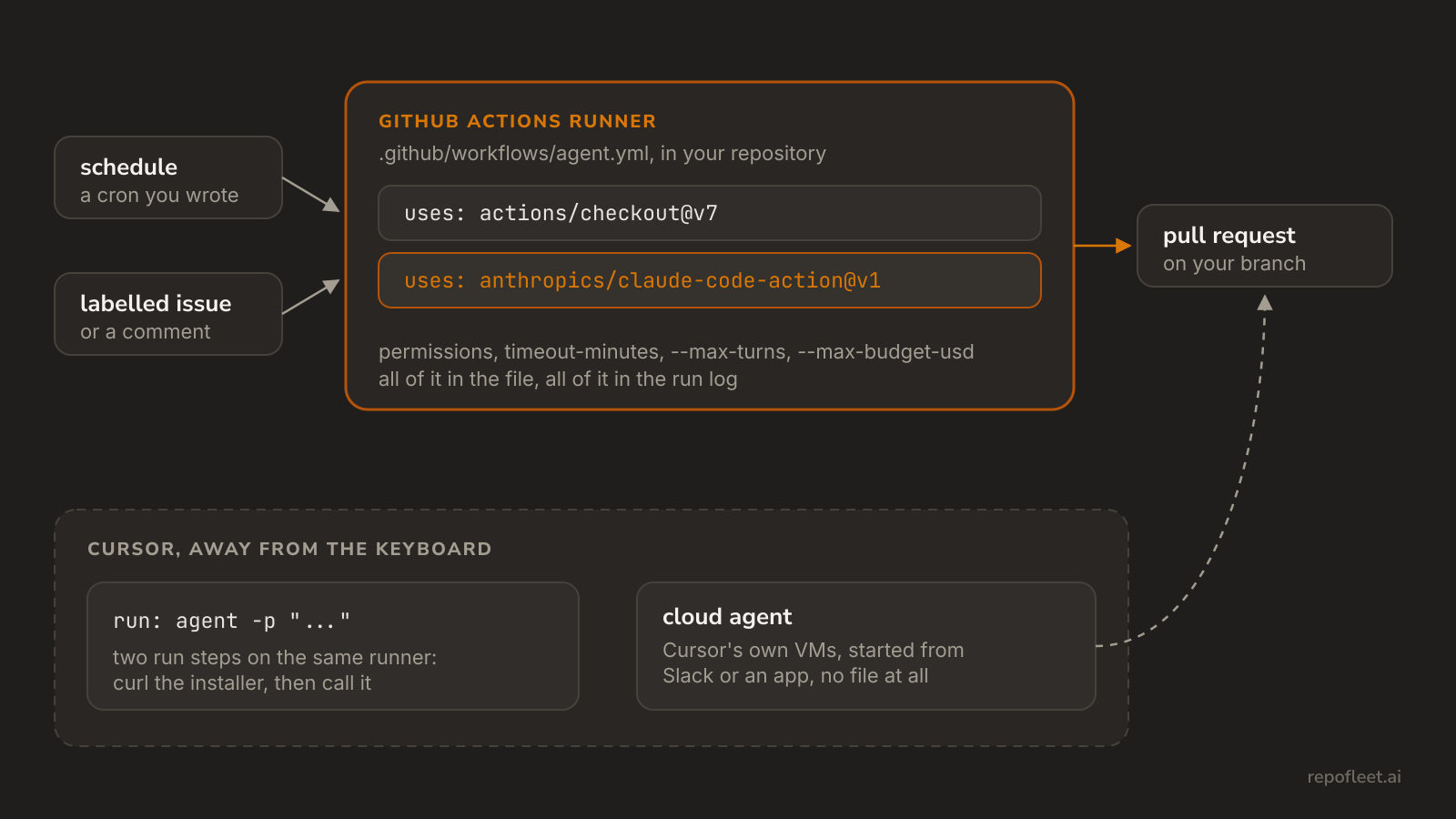
Claude Code, if unattended means a schedule and nobody supervising. It ships a first-party GitHub Actions step, so the run is a file in your repository, on GitHub's runner, billed to a key you hold. Cursor runs unattended too, but from somewhere else: a CLI you install with a curl in a run step, or a cloud agent on Cursor's own machines.
The choice is about what you hand over. A workflow hands GitHub the trigger, the permissions, the timeout, and the log, all of it in a file you review. A cloud agent hands Cursor read-write access to the repository and runs where your CI cannot see it. Both finish work; only one leaves its trail beside every other run.
What each one is
- Claude Code is Anthropic's terminal agent. anthropics/claude-code-action installs it on the runner, hands it your prompt, and gives it git and
ghalready signed in. Given no prompt, it waits for@claudein a comment instead. - Cursor is an editor first: the same agent you drive at the keyboard, with tab completion and multi-file edits around it. Away from the editor it takes two shapes, and only one of them touches a runner.
- The Cursor CLI is the agent as a binary named
agent, installed fromcursor.com/install.agent -pruns it headless, which is what makes it scriptable in CI. - Cloud agents, formerly background agents, run on Cursor's own VMs. You start one from the desktop, web, or iOS app, from Slack, GitHub, Bitbucket or Linear with
@cursor, or from the API, and it pushes a branch and opens a pull request.
What happens when nobody is at the keyboard
- Claude Code waits on a trigger you wrote.
schedule,workflow_dispatch, a labelled issue: whatever triggers and schedules allows. Nothing starts it that the file does not name, and thepermissionsblock is the whole of what it may do. - The Cursor CLI needs the two steps below. There is no official Cursor action, so you install the binary and call it, and the install is whatever the URL serves that morning rather than a ref you pinned.
- name: Install Cursor CLI
  run: |
    curl https://cursor.com/install -fsS | bash
    echo "$HOME/.cursor/bin" >> $GITHUB_PATH

- name: Run the agent
  env:
    CURSOR_API_KEY: ${{ secrets.CURSOR_API_KEY }}
  run: agent -p "Fix the failing test and leave the change in the working tree" --model gpt-5
- Cursor's own docs steer the git work out of the agent. Their recommended shape for CI is to tell the agent not to branch, commit, push or comment, and to do all of that in later steps, so the auditable parts stay deterministic.
- A cloud agent needs no runner and no file. What it does need is an account admin to connect source control, and read-write privileges on the repository and any submodules, and it runs on machines your
permissionsblock does not reach. - Both bound the agent, differently. Claude Code takes
--allowedToolsand its caps inside the step; the Cursor CLI readspermissionsallow and deny lists from.cursor/cli.json.timeout-minutesis GitHub's hard stop over either.
The workflow Claude Code runs from
- Save it as
.github/workflows/agent.ymlon the default branch, addANTHROPIC_API_KEYas a repository secret, and create a label namedagent. How do you run Claude Code in GitHub Actions? explains every line, and run your first agent walks the first one through.
name: Agent

on:
  issues:
    types: [labeled]

# Push a branch, open a pull request, comment on the issue: nothing more.
permissions:
  contents: write
  pull-requests: write
  issues: write

jobs:
  implement:
    # Every label fires the event; only the agent label starts a run.
    if: github.event.label.name == 'agent'
    runs-on: ubuntu-latest
    timeout-minutes: 30
    steps:
      - uses: actions/checkout@v7

      - name: Implement the issue and open a pull request
        uses: anthropics/claude-code-action@v1
        with:
          anthropic_api_key: ${{ secrets.ANTHROPIC_API_KEY }}
          github_token: ${{ secrets.GITHUB_TOKEN }}
          prompt: |
            Issue #${{ github.event.issue.number }} is yours.
            Read it with `gh issue view ${{ github.event.issue.number }}`.
            Do what it asks, and run the build and tests if there are any.
            Commit on branch agent/issue-${{ github.event.issue.number }}.
            Push it, then open a pull request with `gh pr create`.
            Its body ends with `Closes #${{ github.event.issue.number }}`.
          claude_args: |
            --allowedTools "Bash,Edit,Write,Read,Glob,Grep"
            --max-turns 60
            --max-budget-usd 5
- Swap
schedulefor the trigger above and the same file runs on a cron; nothing else in it changes. - The action does the git work: it drops the checkout's credential, signs commits as
claude[bot], and exportsGH_TOKEN, so everyghcommand the prompt names is already signed in. --max-budget-usdstops the run at a spend and--max-turnsat a number of model calls, withtimeout-minutesas GitHub's hard stop over both.
What Cursor still does better
- The keyboard. Cursor is an editor with an agent in it. Claude Code is a terminal, so the review loop is a diff you read rather than a file you are already in.
- The model.
--modelpicks whichever frontier model Cursor offers;anthropics/claude-code-actionruns Claude and nothing else. - Starting work from anywhere.
@cursorin Slack, Linear, or a pull request comment starts a cloud agent with no workflow file, no secret, and no runner minutes. - The modes.
--mode planand--mode asklet the CLI think a change through or answer a question without touching files, and--continuepicks a session back up.
Which one to reach for
- Claude Code, when the unattended run should be a reviewable file: the trigger, the token's scope, the timeout, and the caps all live in one place, and every run lands in the repository's runs and logs.
- Claude Code, when a Claude subscription is what you already pay for;
claude_code_oauth_tokentakes it in place of the key. - Cursor, when the work starts at the keyboard or from a phone, and the agent is one part of an editor you were using anyway.
- Cursor, when the agent has to be a model Claude Code does not run.
- Both, if you are undecided: the action and the CLI's two run steps go in the same file, so trying one costs a commit and reading the run tells you the rest.
| Claude Code | Cursor | |
|---|---|---|
| What you add to the file | anthropics/claude-code-action@v1 |
two run steps: install, then agent |
| The credential | ANTHROPIC_API_KEY, or CLAUDE_CODE_OAUTH_TOKEN from a subscription |
CURSOR_API_KEY |
| The model | Claude | --model, whichever Cursor offers |
Git and gh |
signed in by the action | your own steps, as Cursor's docs recommend |
| What it may touch | the tools --allowedTools names |
permissions allow and deny in .cursor/cli.json |
| Pinned by a ref | the action's tag | no; the installer is whatever cursor.com/install serves |
| Started by a comment | @claude on the issue, when the step is given no prompt |
@cursor, which starts a cloud agent instead |
| Where the unattended run happens | your runner | your runner for the CLI, Cursor's VMs for a cloud agent |
What Repo Fleet does about it
Repo Fleet is where you build these workflows and watch them run, across every repository you connect. The file stays yours: a GitHub Actions workflow in your repository, on your runners, billed to your own key. Repo Fleet holds no model key and meters nothing.
- The agent editor models the Claude Code action and the Codex action as labelled fields, and not Cursor, which has no action to model.
- Every edit is checked as you type, by the same checks the workflow on this page passes.
- A runs page for each repository, newest first, saying what each run shipped.
Open the app, connect a GitHub account and choose its repositories, then pick a template and save it. The next labelled issue is the agent's.