Claude Code in GitHub Actions
What can a Claude Code run actually do in your repository?
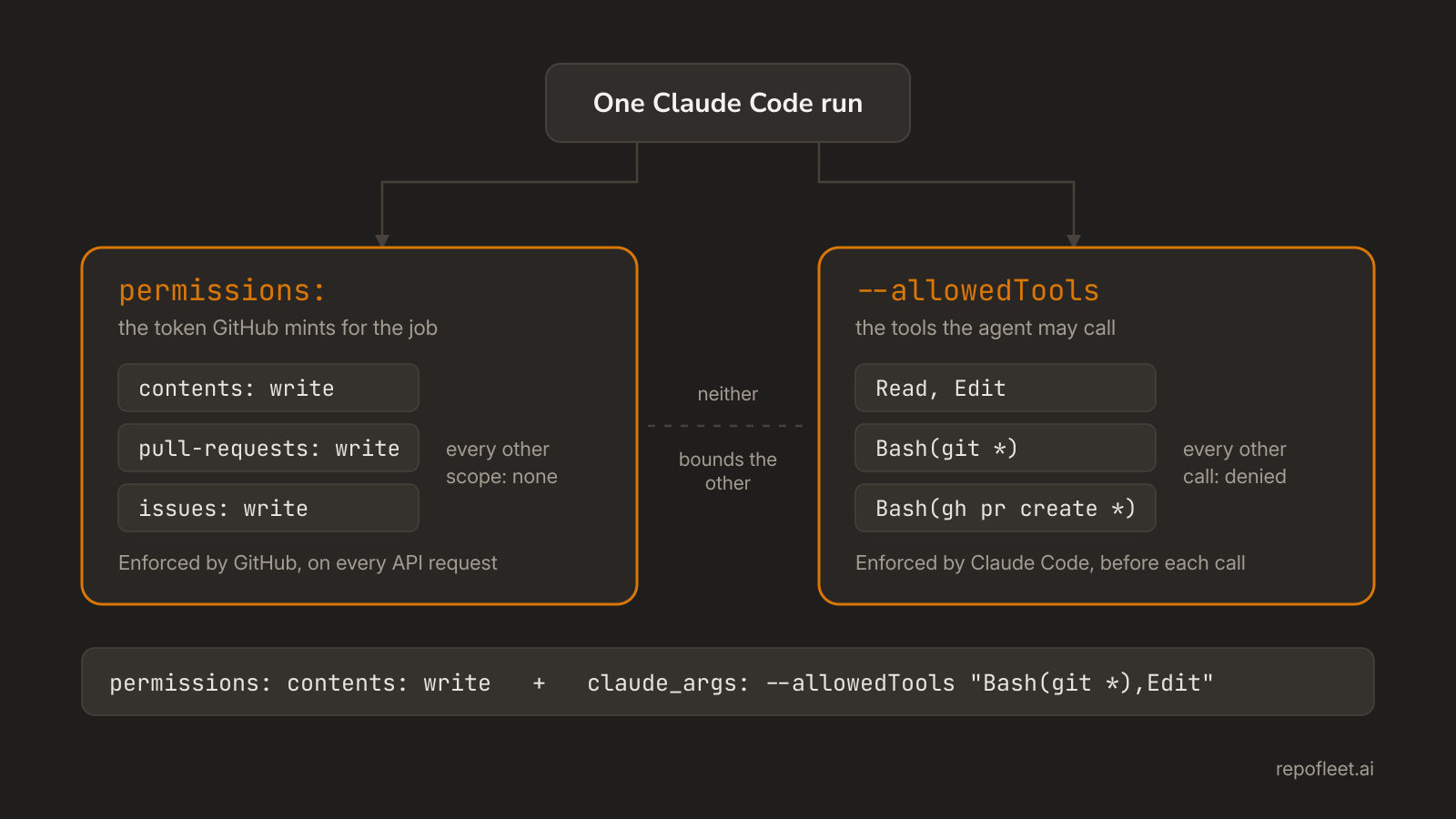
Two systems bound a Claude Code run in GitHub Actions: the workflow permissions block that scopes the token GitHub mints, and allowedTools, which decides what the agent may call. Neither one constrains the other, and an unattended run has to set both.
Listen to this guide
The short answer
Two things decide, and each is enforced by a different owner. The permissions block in the workflow file scopes the token GitHub mints for that job, so it settles what the run may change in your repository. --allowedTools, handed to Claude Code in claude_args, settles which tools the agent may use at all.
Neither implies the other. Allow Bash under a read-only token and the agent tries to push, and GitHub refuses it. Grant contents: write without allowing a tool that runs git and nothing can push at all. Nobody is at the runner to answer a permission prompt, so whatever you have not granted is denied.
Two systems, not one
- GitHub enforces one, Claude Code the other. The API checks the token's scopes on every request; Claude Code checks the tool rules before a tool call runs. Neither can see the other, and no setting in one widens the other.
- They fail in different places. A missing scope is a 403 inside a command the agent already ran. A missing tool rule is a refusal in the transcript, before any command exists.
- A prompt is not a permission. Anthropic's permissions reference says rules are enforced by Claude Code and not by the model, so the prompt and
CLAUDE.mdshape what Claude tries, never what it is allowed. - A hook is a third layer, above both. A
PreToolUsehook that exits 2 stops a call before the permission rules are read at all; hooks and guardrails is that mechanism and where it lives in the repository.
permissions in the workflow |
--allowedTools in claude_args |
|
|---|---|---|
| What it bounds | the token GitHub mints for the job | the tools Claude Code may call |
| Who enforces it | GitHub, on every API request | Claude Code, before each tool call |
| Where it is written | the workflow file, on the job | the action's claude_args, or permissions.allow in the settings file |
| What a refusal looks like | a 403 from git or gh in the step log |
a denied tool call in the agent's transcript |
| What it never bounds | which tools the agent holds | what the token may do, and what the run costs |
What the workflow permissions block grants
- The token, and nothing else. GitHub mints a credential for the job and revokes it at the end, and the block names the scopes it carries. Permissions and secrets is every scope in a table.
- Write it on the job. A job's mapping replaces the workflow's whole rather than adding to it, so the job that pushes names
contents: writeand every other job gets what it names alone. - Unset is not none. A workflow with no block takes the repository default under Settings, Actions, Workflow permissions, and on an older repository that is read and write on everything.
- Whose token it is matters. Anthropic's own examples grant
id-token: write, which the action's default GitHub App sign-in needs; pass your owngithub_tokeninstead, as the file below does, and that token's scopes are the ceiling. - A fork's pull request is read-only and secretless, whatever the block says, so the model key reads as empty there and the step fails partway rather than doing half the work.
- The installed GitHub App is a separate grant. The Claude GitHub App carries one fixed permission set across the installation, Contents, Issues and Pull requests among them; the workflow's block is what narrows a single run.
What allowedTools grants
- It is an allow list, not a tool inventory. The CLI reference defines it as the tools that execute without prompting;
--toolsis the flag that restricts which tools exist, and a bare name in--disallowedToolsremoves one from Claude's context. - A plain-text prompt starts from nothing. Anthropic's GitHub Actions page says it outright: Claude has no shell or GitHub API access until you grant the tools the prompt needs, through
--allowedToolsor apermissions.allowrule in thesettingsinput. - A rule is
ToolorTool(specifier).Readallows every read,Bash(git status *)allows one family of commands,Read(./.env)names a path, andWebFetch(domain:example.com)names a host. - The space before the
*counts.Bash(git diff *)matches anything starting withgit diff, andBash(git diff*)also matchesgit diff-index. - Deny beats ask beats allow. The first match in that order decides and specificity never reorders it, so a broad
Bash(aws *)deny cannot carry a narrower allow as an exception. - A Bash rule matches text, not the program. Wrappers such as
timeoutandniceare stripped first, but the same command written another way is not matched, so a deny rule is a guardrail rather than a boundary. - A
Readdeny rule reaches the file tools. A denied path is denied to Edit and Write as well, which is how.envand a lockfile stay out of reach of every one of them.
Where the two meet on a run
- A pull request needs a yes from both.
contents: writeandpull-requests: writeon the token, and tools that can reach them:Bash(git *)andBash(gh pr create *), or the GitHub tools the action's own MCP server offers. - The failure says which one refused. A 403 in the step log is the token, and Claude reads it and works around it. A refusal with no command behind it is the tool rules, and no scope will change it.
- An unanswerable prompt is a denial. A
-prun starts in Manual mode, so a call that is neither allowed nor read-only would ask, and with nobody to ask it is refused;--permission-prompts nonemakes that explicit and tells Claude not to retry. - Read-only commands run either way.
ls,cat,grep,find,wcand the read-only forms ofgitare a built-in set that needs no allow rule, and only anaskordenyrule takes one back. - Neither system hides a secret. Any allowed shell command reads what the step's
envholds, so a key belongs on the step that needs it and the shell grant belongs nowhere near it; inputs, outputs, and secrets covers where the model key lives. - Neither caps time or money.
timeout-minutesbounds the runner and--max-turnsbounds the loop; costs, limits and troubleshooting covers who pays for what.
Setting both for an unattended agent
- Grant the token scope by scope, on the job. Push, open a pull request, comment on the issue: three scopes, and the run cannot touch a release or a package with any of them.
- Grant the tools the prompt actually needs, scoped to the command families you can name. A broad
Bashis one line shorter and hands the run every command on the machine. - Put the refusals in a settings file. The
settingsinput reads.claude/settings.jsonout of the checkout, so the deny rules arrive on the same commit the agent works on. --permission-mode dontAskcloses the gap. It denies anything the allow rules do not already cover, which is what a locked-down run wants in place of a prompt nobody sees.- Save this as
.github/workflows/agent.ymlon the default branch. Labelling an issueagentstarts a run that can do exactly this much.
name: Agent

on:
  issues:
    types: [labeled]

concurrency:
  group: agent-${{ github.event.issue.number }}
  cancel-in-progress: false

jobs:
  work:
    if: github.event.label.name == 'agent'
    runs-on: ubuntu-latest
    timeout-minutes: 30
    # The first system: what the token GitHub mints for this job may do, and it may do nothing else.
    permissions:
      contents: write
      pull-requests: write
      issues: write
    steps:
      - uses: actions/checkout@v7

      - name: Work the issue
        uses: anthropics/claude-code-action@v1
        with:
          # A Claude subscription signs in with claude_code_oauth_token and secrets.CLAUDE_CODE_OAUTH_TOKEN instead of this line.
          anthropic_api_key: ${{ secrets.ANTHROPIC_API_KEY }}
          github_token: ${{ secrets.GITHUB_TOKEN }}
          # The deny rules below, read out of the checkout above.
          settings: .claude/settings.json
          prompt: |
            Issue #${{ github.event.issue.number }} in ${{ github.repository }} is yours, and this checkout is the default branch.
            Read it with `gh issue view ${{ github.event.issue.number }}`, do what it asks, and run the repository's build and tests.
            Finished: commit on branch agent/issue-${{ github.event.issue.number }}, push it, and open a pull request whose body ends with `Closes #${{ github.event.issue.number }}`.
            A refused command is this repository's answer and not an obstacle: say what you were denied and stop.
          # The second system: which tools the agent may call, and every other call is denied.
          claude_args: |
            --allowedTools "Read,Glob,Grep,Edit,Write,Bash(git *),Bash(gh issue view *),Bash(gh pr create *),Bash(npm *)"
            --permission-mode dontAsk
            --max-turns 40
{
  "permissions": {
    "deny": [
      "Read(./.env)",
      "Bash(git push --force *)",
      "Bash(gh repo delete *)"
    ]
  }
}
.claude/settings.json, committed, is the file thesettingsinput names. A deny rule here outranks every allow rule above, including one you add later in a hurry.- It guards the command, not the program.
git push --forcewritten asgit push -fis a different string, so keep the token narrow as well and treat these as the seatbelt rather than the brakes.
What Repo Fleet does about it
Repo Fleet is where you build workflows like this one and watch them run, across every repository you connect. The file stays what this guide built: GitHub Actions in your repository, on your runners, billed to your own Anthropic key. Repo Fleet holds no key and meters nothing.
- The token's scopes are the job's shield card, scope by scope, with the ungranted below it as chips, so what the run may touch reads without parsing YAML.
claude_argsis a field on the step that runs the agent, beside the prompt and the settings path, and the two systems sit one card apart on the same page.- Every edit is checked as you type by the checks that pass the workflow on this page, including a grant wider than the run needs and a job missing its timeout.
- The runs page lists each repository's runs newest first, so a run that started failing on a refusal is visible without opening the Actions tab.
Install it on GitHub, choose the repositories it may see, and open the workflow in the editor. Both grants are on the same screen.