Claude Code in GitHub Actions
How do you use Claude Code hooks to guard an unattended run?
Claude Code hooks in GitHub Actions: what PreToolUse blocks, how exit code 2 works, where .claude/settings.json lives in the repository, what a blocked action prints in the run log, and what a hook cannot stop.
Listen to this guide
The short answer
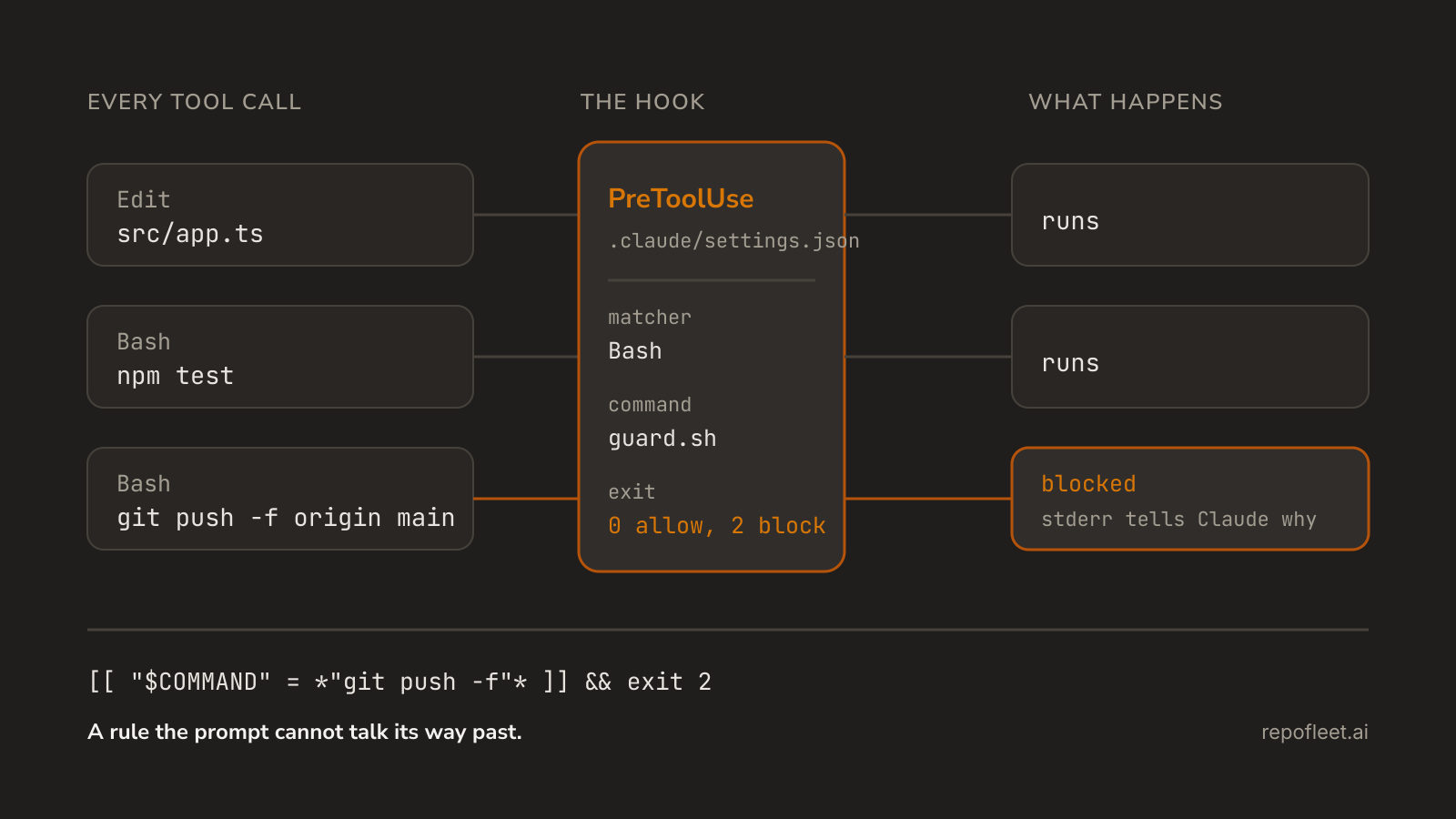
Put the rules in a hooks block in .claude/settings.json, commit it, and name that file on the action's settings input. Claude Code then runs your command at fixed points in its own lifecycle, and a PreToolUse hook that exits 2 blocks the tool call before it happens.
A prompt is a request the model may reinterpret. A hook is a command that always runs. That difference only starts to matter when nobody is at the terminal: on a runner there is no permission prompt to answer, so the file has to answer for you.
What a hook is
- A command bound to an event. The hooks reference lists every event. The three worth knowing here are
PreToolUse, before a tool call executes,PostToolUse, after one succeeds, andStop, when Claude finishes responding. - Configured as JSON, never in the prompt. A
hooksblock names the event, amatcher, and a handler, most often"type": "command". Nothing in the prompt can turn it off. - It reads the call on stdin. The handler gets JSON carrying
session_id,cwd,hook_event_name,tool_nameandtool_input, so a script parses the actual command or file path rather than guessing from the tool name. - Exit 2 blocks. On
PreToolUsean exit code of 2 blocks the call and hands your stderr back to Claude as feedback, per exit code 2 behavior per event. Exit 0 allows it; any other code is a non-blocking error and the call proceeds. - The matcher narrows the event.
"Bash"matches that tool alone and"Edit|Write"matches either. A value holding anything beyond letters, digits and separators is read as an unanchored regular expression, somcp__.*reaches every MCP tool. - The
iffield narrows the handler."if": "Bash(git *)"spawns the script only ongitcommands, using the same syntax as a permission rule, as Automate actions with hooks sets out.
The hooks worth setting on a runner
PreToolUseonBashis the one that earns its place. It sees the command string before the shell does, so a force push, arm -rf, or aghcall against the wrong repository is refused with a reason Claude can read and work around.PreToolUseonEdit|Writeprotects paths rather than commands. Lockfiles,.env, and anything under.github/workflows/are the usual list, and the hooks guide's own worked example protects.env,package-lock.jsonand.git/the same way.PostToolUseonEdit|Writeruns the formatter. A branch nobody watched still arrives formatted, and the diff in the morning is the change rather than the whitespace around it.Stopfires once when Claude finishes responding, which makes it the right place to scan the working tree. The guide recommends it precisely because a tool matcher misses files aBashcommand wrote.SessionStartinjects context instead of blocking. Claude Code adds aSessionStarthook's plain stdout to the model's context, sogit log --oneline -5or the state of a queue arrives without being pasted into the prompt.- Skip the interactive events.
NotificationandPermissionRequestexist for a person at a keyboard. On a runner there is nobody to notify and nobody to ask, so a hook there does nothing useful.
Where the configuration lives in the repository
.claude/settings.json, committed. The reference's hook location table is the whole story:~/.claude/settings.jsonis your machine alone and.claude/settings.local.jsonis gitignored, so the project file is the only one a checkout can carry.- The script goes under
.claude/hooks/and needs its executable bit committed, or Claude Code cannot run it.git update-index --chmod=+xfixes a file already committed without one. $CLAUDE_PROJECT_DIRresolves the path. Claude Code sets it to the project root the session started in, both as a placeholder in the command and as an environment variable on the spawned process, so the hook works whatever the working directory is.- Name the file on the step. The action's
settingsinput takes "Claude Code settings as JSON string or path to settings JSON file", so the run loads your hooks explicitly rather than by discovery.
{
  "hooks": {
    "PreToolUse": [
      {
        "matcher": "Bash",
        "hooks": [
          {
            "type": "command",
            "command": "\"$CLAUDE_PROJECT_DIR\"/.claude/hooks/guard-bash.sh"
          }
        ]
      }
    ]
  }
}
#!/bin/bash
# .claude/hooks/guard-bash.sh, and jq is already on GitHub's Ubuntu runner images.
COMMAND=$(jq -r '.tool_input.command // empty')

# Denied outright rather than asked about, because on a runner there is nobody to ask.
for pattern in "rm -rf /" "git push --force" "git push -f " "gh repo delete"; do
  if [[ "$COMMAND" == *"$pattern"* ]]; then
    echo "Blocked: the command matches '$pattern', which this repository never runs unattended." >&2
    exit 2
  fi
done

exit 0
name: Guarded agent

on:
  issues:
    types: [labeled]

permissions:
  contents: write
  pull-requests: write
  issues: write

concurrency:
  group: guarded-agent-${{ github.event.issue.number }}
  cancel-in-progress: false

jobs:
  work:
    if: github.event.label.name == 'agent'
    runs-on: ubuntu-latest
    timeout-minutes: 30
    steps:
      # The hooks travel in the checkout, so they are read from the same commit the agent works on.
      - uses: actions/checkout@v7

      - name: Run the agent
        uses: anthropics/claude-code-action@v1
        with:
          # A Claude subscription signs in with claude_code_oauth_token and secrets.CLAUDE_CODE_OAUTH_TOKEN instead of this line.
          anthropic_api_key: ${{ secrets.ANTHROPIC_API_KEY }}
          github_token: ${{ secrets.GITHUB_TOKEN }}
          # The path to the settings file the hooks live in, read from the checkout above.
          settings: .claude/settings.json
          display_report: true
          prompt: |
            Issue #${{ github.event.issue.number }} in ${{ github.repository }} is yours, and this checkout is the default branch.
            Read it with `gh issue view ${{ github.event.issue.number }}`, do what it asks, and run the build and tests if the repository has any.
            Finished: commit on branch agent/issue-${{ github.event.issue.number }}, push it, and open a pull request whose body ends with `Closes #${{ github.event.issue.number }}`.
            A hook that blocks a command is telling you the repository forbids it: find another way rather than working around it.
          claude_args: |
            --allowedTools "Bash,Edit,Write,Read,Glob,Grep"
            --max-turns 40
What a blocked action looks like in the log
- It lands inside the agent's step, not in one of its own. The hook writes to stderr, Claude Code blocks the call, and the same text comes back to the model as feedback, so the transcript reads as a refusal followed by a second attempt.
- A wrong exit code fails open. Any code other than 0 or 2 is a non-blocking error: the action proceeds, and the transcript shows a
<hook name> hook errornotice with the first line of stderr prefixedFailed with non-blocking status code:. A guard that quietly stopped guarding looks exactly like this. - Plain stdout is nearly invisible. On exit 0, Claude Code writes stdout to the debug log alone, except on
UserPromptSubmit,UserPromptExpansion,SessionStartandPostModelSwitch, where it becomes context. Debugging a hook means stderr, notecho. --debugcaptures the rest. The guide points at debug logging for the full stderr behind that truncated first line, andclaude_args: --debugis where a run puts it.display_report: truewrites the run's report into the job summary, so what the run cost and how it ended is readable without opening a log at all./hooksis not available to you here. It is an interactive, read-only browser of what is registered. On a runner the settings file in the checkout is the only inventory, which is a good reason to keep it small.
What hooks cannot do
- They do not replace the permission system. The documentation says outright to use the permission system rather than a hook for a hard allow or deny, because
iffiltering is best effort: Claude Code runs the handler anyway when it cannot work out which commands aBashinput runs. - A tool matcher only sees tool calls. Claude can write a file by running a shell command, which no
Edit|Writematcher catches. The guide's own answer is to matchBash|PowerShellas well, or scan the tree once a turn fromStop. - Your machine's hooks are not the runner's.
~/.claude/settings.jsonand.claude/settings.local.jsonnever reach a checkout, so a guard tested locally can be absent in CI and nothing announces it. - Anything that edits the settings can disable them.
"disableAllHooks": trueturns every hook off, and it is honoured from--settingstoo, so a run allowed to rewrite its own configuration has no guardrails. - They cap nothing you are billed for. Minutes are bounded by the job's
timeout-minutesand model spend by--max-turnsand--max-budget-usdinclaude_args, never by a hook; costs, limits and troubleshooting covers who pays for what. - They do not narrow the token. What the run may do to your repository is decided by the
permissionsblock, and permissions and secrets is where that is set.
What Repo Fleet does about it
Repo Fleet is where you build workflows like this one and watch them run, across every repository you connect. The file stays what this guide built: GitHub Actions in your repository, on your runners, billed to your own Anthropic key. Repo Fleet holds no key and meters nothing.
- The trigger, the permission scopes, the timeout, the
settingspath and the prompt are plain fields in a visual editor, with the YAML one tab away. - Every edit is checked as you type by the checks that pass the workflow on this page, including the ones that catch a missing timeout and a grant wider than the run needs.
- The runs page lists each repository's runs newest first, so a guarded run that started failing is visible without opening the Actions tab.
- The hooks are the guardrails; running the agent at all is the file they bound, and the same guards apply on any trigger it takes.
Install it on GitHub, choose the repositories it may see, and open the workflow in the editor. The hooks ride in the same commit.